If you’re in private practice, or just starting out, marketing your therapy business might feel difficult or stressful.
There is a lot of information out there, and it can be confusing, and at times overwhelming.
So in this article, I thought I’d explain what you really need to know – with no jargon, and nothing that’s not going to move the needle.
The guide is long, but if you’re looking to fill your calendar with bookings for years to come, it has everything you need to know.
The vast majority of what we’ll discuss does not require a huge budget – in fact, most of these suggestions you can implement for free.
And if you’re looking for more tips and advice about marketing your counseling practice, subscribe to our email list with the form below (unsubscribe any time):
Contents
- Who am I
- Step #1: define your niche
- Step #2: check your website fundamentals
- Step #3: check your SEO and AIO fundamentals
- Step #4: optimize your Google My Business Listing
- Step #5: optimize your therapist directory presence
- Step #6: network in-person
- Step #7: monitor and measure performance
- What about social media?
- What about paid ads?
- Conclusion
Who am I
Before we get started, I thought I’d introduce myself, so you can learn about my background and where this advice is coming from, if you’re interested.

I’m Tom, and I have nearly a decade of marketing experience, helping drive customers to businesses, including therapy practices. I have about three years’ experience in the mental health space specifically, and have helped nearly a hundred therapists attract more clients.
I focus on the digital side of things, including SEO (search engine optimization), AI optimization, paid ads, website design, and of course copywriting.
I get that there is often conflicting advice out there when it comes to marketing, and often things aren’t explained very clearly for those without extensive experience.
A lot of advice also focuses on defining concepts and terms that aren’t directly important to the success of your business, rather than explaining what you need to do and why. A lot of it is also quite airy and vague.
Fortunately, from working with quite a lot of different types of businesses, including private practice therapists, I know how to explain things in a way that’s (hopefully) easy to understand, and cuts straight to the chase.
But if I’ve not done that at any point, and you have any questions, or if you’re just looking for advice, feel free to email me at tom (at) counseling (dot) co.
You can also book a 90-minute consulting call with me here if you have any questions about marketing your private practice, need help with your marketing plan, or just don’t know where to start.
Step #1: define your niche
The number one most important thing you can do to market yourself effectively as a therapist in private practice is to define a niche that you focus on.
Marketing relies on answering “why” questions that the potential client may have, such as:
- Why is this therapist the right fit for me?
- Why should I choose this therapist amongst all others out there?
- Why I should I trust this therapist enough to open up to them, and discuss potentially very personal topics with them?
The easiest way to answer these questions is to narrow down your focus to the greatest extent possible, based on your experience and interests as a therapist, psychologist, or counselor.
For example, maybe you focus on providing Christian couples’ counseling, or help veterans struggling with PTSD.
If you are providing in-person counseling in larger cities, you can consider going a step further, and niching down even more, since you have a larger base of potential clients.
In smaller towns or cities, your niche can be broader. You might also like to tailor it based on the demographic makeup of the area you’re in, of course as well as your expertise and interests. Still though, you should niche down to the greatest extent possible.
By defining a close, well-defined niche that you are passionate about:
- Copywriting and blogging (if you choose to) becomes easier, because you have a greater level of passion and interest in the subject you’re discussing.
- SEO becomes easier, because there is less competition. You will compete for “long tail” keywords, meaning longer, more detailed search terms, which are easier to rank for, because fewer people focus on optimizing for them.
- Word of mouth referrals increase, because clients will have friends in their circles who are facing similar issues, and you are positioned as a specialized source of help for this group of people.
If you don’t have a niche or specialty, it is much harder to answer the “why” questions we mentioned before.
If you describe yourself as a therapist or counselor that does everything (or a lot of things), it is infinitely harder to stand out from the crowd.
Step #2: check your website fundamentals
The topic of therapy website design deserves a post of its own, and I completely get that editing your website and trying to figure out SEO can be overwhelming or stressful.
So, in this part, I’ve just discussed the most important things to pay attention to, and explained exactly what you need to do to improve performance.
I will assume that at a basic level, you have a website up and running, which describes yourself/your therapy practice and the help you provide.
If you haven’t got started with this yet, we recommend building on Squarespace because it does a lot of the fundamentals for you, such as many of the SEO basics, and allows you to edit your website fairly easily compared to if it were custom-coded from the ground up.
However, if you have a private practice with a larger team, and a bigger budget, getting a website professionally designed is definitely worth considering.
Here is a checklist of the most common issues with therapists’ websites that affect your ability to attract clients.
1. Do you engage your target clients effectively?
This comes back to defining your niche.
On your website, you should clearly explain:
- The types of people you help.
- The types of problems you help with.
- How you help (and how specifically you are able to help).
This information should be prominent – meaning, on your homepage, not buried deep on a services page.
There should also be enough written content on your website to cover the subject matter (your mental health niche) thoroughly, to demonstrate to people, search engines, and AI that you are a subject matter expert.
Blog articles can be a great way to demonstrate your expertise in this way, and are a particularly effective method of engaging and getting the attention of LLMs – convincing them that you are worth recommending to someone looking for the type of help you provide.
2. Is your copy easy to digest?
Often the easiest way to improve website copy is simply to simplify it.
Ensure that any and all jargon is gone, and that what you’re saying can be easily understood, even by someone who has never been to therapy before.
Break down paragraphs so that they are an absolute maximum of three sentences long, and ensure your body text font size is nice and large, so that the website is easy to read.
3. Is your website accessible?
We have found that many therapists’ websites have accessibility issues they are completely unaware of, and are often easy to fix.
By accessibility issues, we mean that sections of the website can be difficult to use for people relying on assistive technology, such as screen readers.
Apart from being a problem in that those with a disability cannot use your website, this is also an SEO issue, because search engines grade your website accessibility when deciding whether to display it to people.
Fortunately, Google shows you this score and explains what you can do it improve it.
Go to Google Pagespeed Insights and paste in your website URL. Ignore the performance metrics, and click on “Accessibility.”
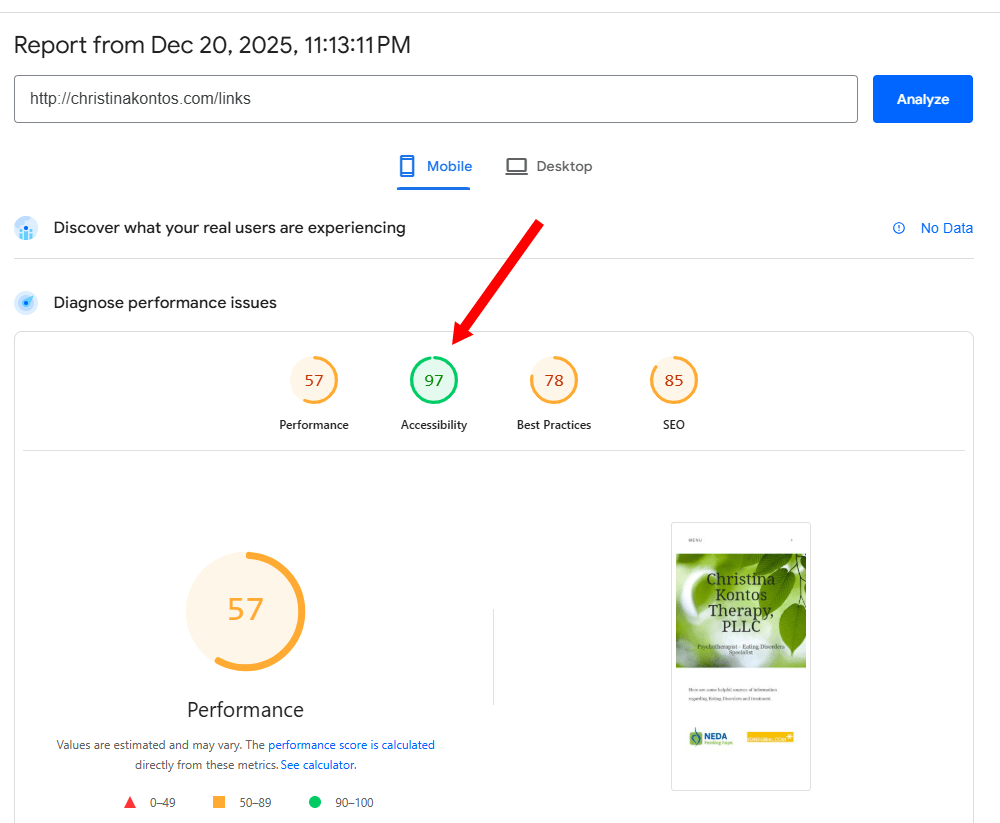
Then, you’ll see accesibility recommendations shown. Focus on the ones with a red triangle next to them.

This website is performing well, as its score is 97/100, which is great.
Many of the recommendations that are often shown here, such as relating to “document landmarks,” “heading elements” or “ARIA attributes” you can safely ignore.
However, you will often find improvements relating to alt text (written descriptions of images on your site) and color contrast, which you can fix to make a major improvement to your website accessibility.
The former will require you to add these descriptions using your website builder such as Squarespace or Wix, by going to each image individually, and writing a short description of what the image shows in the “alt text” field.

The latter will require you to potentially change your background or text colours so that the website is easier to read for those with a vision impairment.
4. Do you have a clear call to action?
Across your website, there should be a clear, consistent, prominent “call to action” (CTA) – something you want people to do to begin working with you.
The nature and wording of the CTA can vary, and is a matter of personal preference – such as whether you prefer people get in contact first, versus make a booking immediately on your calendar.
For example, you could use something like:
- Book a trial session
- Contact us
- Schedule an appointment
What matters most is that the messaging is consistent across the website, and the CTA is displayed prominently.
Normally, you want to display the call to action on the top right of the main navigation bar.
If you feel up to it, and are confident using your website builder, formatting the CTA as a button with a colour that stands out from the rest of your website is helpful to attract attention to it, but the CTA is also fine as a plain text link.
If your main goal is to get more new clients, do not use multiple calls to action, like this:

For new clients, this is confusing and can lead to indecision. People will question whether they should get in contact first, or schedule an appointment to get started.
Once your CTA is defined, it should be used consistently across your website. For example, you might like to have CTA buttons or links leading to your contact page placed on your homepage, or at the bottom of service pages.
Once the user lands on your contact or scheduling page, again the language should match up with what the CTA states. If your CTA is “contact us,” the link should go to a contact page, and there should be a phone number, an email address, and a contact form on that page.
Hint: if you write your email address on your website, format it like this: tom (at) counseling (dot) co – otherwise it will be collected automatically by bots, and you’ll begin receiving endless amounts of spam emails offering website design and SEO services.
5. Is your website mobile-friendly?
From owning a number of different therapist directories, we have found that around 35% of those searching for a counselor do so on their mobile phone.
If your target clientele is younger, such as aged 20-30, this number may be higher.
It is not necessary for your mobile website to be perfect, and many platforms like Squarespace do a really good job of handling this automatically.
However, we still see many therapists’ websites have issues that make their mobile websites difficult to use.
Open your website on your phone, and check for these issues:
- Small text that is difficult to read.
- Small images that make it difficult to see what is pictured.
- Links that are too small to tap easily.
- Broken forms – at the very least, make sure that you can enter information into and submit your contact form on a cell phone.
Google primarily assesses websites as they appear on mobile devices, so if you have these types of problems, this will negatively impact your visibility on search engines.
These types of issues most commonly crop up if you have a relatively old website that was not built with mobile devices in mind.
If you see these types of issues, this may be a sign it’s a good time to upgrade your website to a platform that manages mobile compatibility automatically, like Wix or Squarespace.
6. Does your website prominently display high-quality photos of you and your space?
This one may seem obvious to some of you, but we still see many therapist websites that come up short when it comes to the imagery they’re showing.
Clients need to be reassured that they will connect with you once you meet, and that they will feel comfortable opening up in your space.
Therefore, it is really worth the investment to get proper photos done, and display them prominently on your website.
If you are just doing online therapy, the same advice applies – show at least three different professional photos on yourself, again in prominent positions, such as on the homepage.
If you’re a therapy practice with a team, you can lean more towards showing your space. You should also have a page showing each of your counselors with a profile picture, with more detailed individual profile pages that users can click through to.
Each counselor profile page should show more images, and allow the therapist to introduce themselves, their focus areas, and their expertise.
Investing in professional imagery can also be extremely helpful for improving your Google My Business listing, which we’ll discuss later in the article.
Step #3: check your SEO and AIO fundamentals
SEO stands for search engine optimization, and refers to work you can do to make your website surface more often for relevant terms people are searching on Google, Bing, and other search engines.
AIO is SEO’s much younger cousin, and stands for AI optimization. It refers to work you can do to make your website surface more often for relevant queries on LLMs such as ChatGPT and Claude.
These two topics can seem infinitely complex, and I realize there is often confusing or conflicting advice out there, especially when it comes to SEO.
Fortunately, therapist/counselor SEO is not like doing SEO in an industry like mortgages or credit cards. It is not as competitive.
Also, the process of performing AIO is extremely similar to the SEO process. Most of the positive things you can do for search engines will improve your visibility in AI as well.
Therefore, you can begin seeing improved performance relatively easily, just by focusing on the following two things.
1. How you’re describing your pages to bots
Arguably the most important aspect of SEO and AIO (AI optimization) is what keyword is in your page title and webpage main heading.
- A keyword is a Google search term that clients use, such as “eating disorder therapist houston.” In general, most people looking for a certain type of therapist type the same phrase into Google. This phrase is known as a keyword.
- Your page title is what the page is officially titled. This is not visible to users on the page, but does appear next to the site icon at the top of the web browser, and appears in Google search results. It is easy to edit with most website builders – we’ve explained how to do this at the end of this section.
- Your main heading (also known as Header 1 or H1) is the main header displayed on the webpage. When editing a page on Squarespace for example, look for the “Header 1” label – this text is your H1 heading. This is also easy to edit, and again we’ve explained how to do this a bit below.
These are the most important things that Google and LLMs use to determine what your page is about, and what queries to surface it for.
So, it’s worth optimizing your title and main heading to contain the terms you want to show up for, with similar wording.
With your homepage for instance, here are some good examples, for both the title and H1.
- Clarity Care – LGBT-Affirming Counseling In Los Angeles
- Los Angeles Anxiety and OCD Therapist – Clarity Care
- LA Couples’ Counselor – Stephanie Smith LMFT
Some things to note:
- Your title and H1 should at least roughly match each other, and can contain the exact same words. They should not say completely different things, as this can appear misleading to search engines.
- Your title and H1 should match the content of the page. If you describe yourself as offering LGBT-affirming counseling in your homepage title and H1, the homepage (and rest of the site) should do the same, rather than focusing on other types of care.
- Your title should be a maximum of 60 characers long, including spaces. If it’s too long, Google will cut it off, meaning it will appear incomplete on the results page, and you’ll see a lower number of clicks to your website.
- Stuffing the title and H1 with as many keywords as possible is not a good idea and can lead to repurcussions from Google, as it is considered spam. For example “LGBT Affirming Transgender Accepting Counselor Therapist In LA” is not a good example, neither for a title or H1.
You can do the same thing on your service pages if you have them, optimizing the title and H1 about the service or type of care you provide.
On other pages, such as your about and contact page, it is less likely someone will land on these as a first port of call from AI or a search engine, so your title and H1 are less important. Something along the lines of “Contact Us – Clarity Care” for a title and “Contact Us” for an H1 will work well.
How to edit your page title on Squarespace
On Squarespace, go to the SEO/AIO section, then click the arrow on the box titled “Pages with metadata.”

Then, click “EDIT” on the page you want to edit the title of.

Then, you’ll be able to edit the page title.

How to edit your Heading 1 on Squarespace
Edit the page, and look for the heading with the label “Heading 1.”

Squarespace should add one on each page to begin with automatically. Do not add multiple headings with the Heading 1 tag on the same page – there should be one per page.
2. How others are describing you
Arguably the second most important aspect of SEO and AIO is how often you are being mentioned on other websites, in reviews, and on social media.
Search engines and LLMs do not just rely on the content of the page to decide whether to rank or serve your website. Otherwise, it would be relatively easy to ensure you appear often, just by using the right keywords in the right places on the page.
Instead, they also look at how your business is described elsewhere on the web, as a measure of your authority.
In the old days of SEO, when search engines weren’t as smart, the most important type of mention was links to your website. If you received a link from an authoritative website, such as a government department, this was a strong positive signal in the eyes of Google.
These days, while links are still important, you can also benefit by being mentioned by name, even without a link, including on social media platforms as well.
For you as a therapist, it’s good to get mentioned in as many places as possible.
This is an indirect benefit of getting listed on therapist directories such as our one at Counseling.co – register here for free if you haven’t already. However, you should also make sure to:
- Register with the Better Business Bureau, or claim your listing.
- Register with your local Chamber of Commerce (they often list members on their website) if possible.
- List on Yelp and Nextdoor.
- List on Google Maps (through Google My Business) and Apple Maps (through Apple Business Connect). You may also want to consider Bing if your audience skews older, using Bing Places.
- Ensure your details are up to date on the NPI Registry using this page.
- Register with any other professional associations you are entitled to list with, such as the AAMFT Therapist Locator, APA Psychologist Locator, and so on.
Across all your listings and mentions, ensure that you are described consistently, in terms of:
- Your name, licensing, and qualifications.
- Your business name.
- Your address.
- Your phone number/email address.
- The services you provide.
To go above and beyond, anything else you can do over time to increase the number of places you and your business are mentioned online will be helpful for your SEO and AI visibility.
These extra mentions normally come about through things such as:
- Collaborating with other businesses or community organizations.
- Providing expert commentary to online news/other publications (if you know anyone in local journalism, mention you’re always available to speak on mental health issues).
- Blogging about trending topics – if you can be the first to cover something well, such as a particular issue or type of treatment, your article may be referenced by other publications that pick it up later.
Doing this sort of work takes time, but fortunately, mentions elsewhere on the web can happen naturally as your business grows, so you don’t necessarily need to focus on it.
You can move the needle significantly just by taking care of the local citations we mentioned, which are in your immediate control.
Step #4: optimize your Google My Business Listing
Possibly the best quick win you can get as a therapist is ensuring you have an active, well-optimized Google My Business (GMB) listing.
The information you put in GMB is what shows up when people search your business name on Google, and it will also show up on Google Maps.
Google Maps results can also display in regular Google search, meaning having a well-optimized GMB listing can drive huge amounts of visibility, if you offer in-person therapy.

If your practice is online-only, you won’t be able to create a GMB listing unfortunately – doing so requires verifying your business address by receiving a code in the mail.
If you do have an in-person practice, you can set up your GMB profile here if you don’t have one already.
Once you’re up and running, here’s what you need to do to optimize your profile and begin improving your visibility.
1. Optimize your business name
Your business name on your GMB profile plays a massive role in what user queries you display for.
Optimizing this is sort of similar to optimizing your page title and Heading 1 as we discussed before, in that you ideally want your name to contain your main keyword – the primary search term you’re targeting.
If we search “ocd therapist houston” for example, the results that display at the top all contain “ocd” in the business name, and most contain “Houston” as well.

Therefore, if this niche was the primary focus of your business, it would be extremely beneficial if you could get these two words into your GMB business name.
However, your GMB business name must match your actual business name, and cannot be misleading, or stuffed with keywords. If you set it to something like “Integrative OCD Anxiety PTSD Therapist Houston Dallas Phoenix,” Google will change it and possibly penalize your listing.
A good business name looks something like this:
- Clarity OCD Therapy Services Atlanta
- Stephanie Smith OCD Therapist Georgia
In general, speaking about your business name more broadly, it is better to choose something that is not centered around your own name, if possible.
Having your name prominently displayed in your GMB business name, website title, and website H1 heading helps to optimize your SEO and AIO for just that – your name.
We have worked with therapists that have written books for example and are very well-known, and in this case, this strategy works well, because people often search for the therapist by name.
However, for most, it is better to optimize your presence around broader keywords such as “anxiety counseling,” “LGBT affirming therapy” and so on.
2. Choose the right business categories
Your GMB profile allows you to specify the category of business you are.
In most cases, “psychotherapist” is a good choice. If you can find another category that more closely fits what you do, choose that instead.

There are also additional categories you can add. It’s good to include two or three extra categories, if you can find relevant ones to add.

3. Write a thorough business description

In this section, you want to just about use all of the 750 character limit, describing who you are, who you help, how you help, and what makes your counseling service unique.
This language should match the copy on your website, but should not be copy-pasted word for word.
It is useful to include keywords in here as well, but try to above all keep your writing natural-sounding.
Good:
- I’m Stephanie, and I provide LGBT-affirming counseling in Denver.
- I am an LGBT-affirming counselor based in Denver, Colorado.
Bad (because this is unnatural writing with keyword stuffing, which will be penalized):
- I provide transgender LGBT gay-affirming inclusive queer-friendly counseling in Denver.
4. Fill out (nearly) all available options
As much as possible, fill out all of the available options Google provides on your profile.
For example, you can:
- Specify your website and other contact details (essential).
- Specify your opening hours (essential).
- Link to your social media (essential).
- Upload images of yourself and your practice.
- Identify your business as women-owned (under “More” > “From the business”).
- Specify if you have parking available.
- Specify if you have accessibility options such as wheelchair ramps.
- Specify if you also offer online appointments or on-site visits.
The more information Google has to work with, the more likely they are to serve your listing, especially if you’re competing against other profiles that are not fully filled out.
However, if something doesn’t apply to your business, don’t fill it out with incorrect information.
5. Post photos of your practice
GMB does not allow you to attach photos to your listing directly. However, you can post photos in GMB, and these will show up in Google search results inside your business listing.

Having photos helps to improve the click-through rate to your website, meaning you’ll receive more visitors.
Having a higher click-through rate can also further improve your rankings in Google, because it demonstrates people are interested in your business. Google takes this as a signal that it should recommend you more often.
To post images, click the “Photos” icon next to your business on the main GMB page, and choose photos to upload.

You want to upload high-quality photos of yourself and your practice. Having at least four to five pictures, ideally professionally taken, is a great place to start.
6. Post occasional updates
As well as photos, you can also make text posts on your GMB profile, similar to how you would on Facebook.
To post to GMB, click the icon on the right of “Photos” (shown in the image above), and you’ll be able to begin writing. You can also add images to a post if desired.

If possible, it’s a good idea to post every three to four weeks or so, or at least when you have something to announce, like a new service offered, or a new therapist joining your practice.
This just helps to provide Google more context around your operations, and signal that you are active.
Adding images to posts is a great idea if possible. You may like to design images with Canva, based on what you’re posting about.
Images of your practice can make a good backdrop for a Canva design, or you can find free-to-use ones on unsplash.com.
7. Get reviews
This is the hardest part, but if you can get good reviews on your GMB listing, this can massively increase your visibility in Google, and especially Google Maps.

Plus, some LLMs (especially Gemini, because it’s a Google product) read these reviews, meaning they can influence how likely AI is to deem you as experienced, reliable, and worth recommending.
You don’t need 50 or more reviews to move the needle. Having just 5-10 can make a real difference.
The best way to get more Google reviews is to ask clients gently for one at a time you feel is right, if allowable under your professional ethics code (APA guidelines for example prohibit doing this).
If you can’t or don’t want to ask for reviews directly, the next best thing to do is just provide amazing service, and reviews will naturally come over time – especially if your GMB listing is well-optimized, meaning it has good visibility.
Step #5: optimize your therapist directory presence
First, make sure to sign up to our directory at Counseling.co – it’s free, and you can register here.
Optimizing your therapist directory profile is fortunately quite straightforward.
Here’s what you need to do:
- Ensure your picture is professionally taken – well-lit, with a neutral background/setting, clear from distractions. Your face should be shown clearly, and take up around half of the height of the picture – meaning, it should not be so small that detail cannot be seen.
- Ensure everything is up to date, such as the prices you’re charging, and the insurance you accept.
- Ensure you have selected your specialties and treatment methods properly. This is crucial – on larger directories, the chances of showing up near the top in a given city are quite low, so most of the time, people will find you by using the search filters.
- Ensure the language you’re using matches what is used on your website. And again, ensure to immediately communicate who you help, how you help them, and how you’re uniquely qualified to assist with these problems.
- Just like on your website, ensure the language you’re using is free of jargon, and easy to read, broken down into short paragraphs.
If you’re wondering if listing on a directory is worth your money, the main thing to check is how much traffic the website is getting.
You can do this using this tool from Ahrefs.
Essentially, what this is doing is estimating how much monthly Google traffic a website is receiving. This is labelled as “Organic traffic” in the tool.

Normally, this estimate provides a good ballpark figure, but is generally low by a factor of about half. It also excludes other traffic sources such as social media, and direct website visits.
However, though it is rough, this number can be a good way to compare the relative visibility you might expect to get with different paid therapist directories you can choose between.
Step #6: network in-person
Returning again to the importance of defining your niche: if you can do this well, it can be a great way to make in-person networking and getting your name out there in the community a lot easier.
For example, if you help people in a specific demographic, think about the community groups and other places they tend to spend time. For example, if you offer Christian counseling, this could be a church.
You might like to approach these organizations and introduce yourself, and explain the support you can provide for this specific group of people. The more niched down you are, and the more this is relevant to the group, the more success you will have in doing this.
To make the initial approach a little easier for all involved, consider offering something of value for free, like a workshop or a presentation on mental health exercises and coping strategies.
Step #7: monitor and measure performance
The main determinant of whether or not your marketing is working is how full your calendar is.
In general, measuring the relative performance of your different marketing channels (such as Google, AI, and word of mouth) is not difficult. You can ask your clients where they heard about your practice after their first session.
However, there are some free data sources you can use to better inform what you’re doing, especially on the digital side of things. This can be extremely useful in giving you an upper hand in getting more clients.
Google search console

What it does
Google Search Console (GSC) shows you what people are searching to land on your website. It also shows what pages they’re landing on, and how your rankings (position) are changing over time.
- Clicks refers to the number of clicks your website received from Google search.
- Impressions refers to the number of times your website was seen in Google search.
- CTR refers to the click-through rate from the Google search results page to your website. This is the number of clicks divided by the number of impressions.
- Position refers to your average position on the page – #1 means you are at the top, the first result to display.
How to use it
You can use GSC to:
- Test whether the keywords you’re targeting in your page title and Heading 1 are effective in attracting clicks to your website.
- Find new keywords you may want to target, such as by adding a new service page, based on what people are searching.
- Assess the performance of blog posts, if you write any, in attracting clicks.
Unfortunately GSC does not currently provide information on which Google service the traffic is coming from, such as search, AI overviews, Gemini, or Google Maps.
How to get started
Once you log in to GSC, you’ll see this screen:

Go to your website in another tab, and copy the exact URL you find there, such as “https://counseling.co/.” Paste this into the field on the right and click “CONTINUE.”
Now you need to verify ownership of your website.
In Squarespace, go to Analytics > Traffic, then click Search Keywords. Then click “CONNECT” and you’ll be able to link Squarespace to GSC through your Google account.

If you’re not using a website builder, you’ll need to ask your developer to add a code snippet or an HTML file from the GSC settings to your website.
You can find this code snippet or file inside GSC after progressing from the first screen where you input your site URL.

Google My Business Performance metrics

What it does
Inside Google My Business, you can see data on a range of different topics, such as:
- How many people are reaching your website through your listing.
- What people are search for to see your listing.
- What devices people are using to reach your website.
- How many bookings you’re receiving through your GMB listing.
- The proportion of people using Google search versus Google Maps to find your business.
How to use it
You can use this data to:
- Assess the performance of the keywords you’re targeting with your page titles, GMB business name, and Heading 1. Ideally, you should see people coming in from terms other than just your name, or your business name, indicating that you are reaching people who are not aware of you already.
- Measure the effect of different initiatives you take to improve your Google presence, such as getting more reviews, or posting more often.
- Find new keywords to target – similar to what GSC allows you to do.
How to get started
Once you have GMB set up, Google search your exact business name, and you should see this widget pop up.

Click on the Performance link to view your performance metrics.
Microsoft Clarity
What it does
In the industry we call tools like Clarity “session recording” software.
With it installed, you can view live replays of user visits to your website. It’s sort of like looking over someone’s shoulder as they browse your website.
The user is not identified, but you can view their country, and the type of device they’re using.
This can feel intrusive to some, and a few therapists we work with decide not to use Clarity for this reason.
However, the insights this tool provides are invaluable.
How to use it
Once you open Clarity and have data in it, go to “Recordings” at the top, and you will see a list of users that have visited your site on the left.

Click one of these, and the session recording will begin to play on the right. You can choose to pause the video, make it play faster, or skip periods of user inactivity.
By viewing session recordings, you can:
- Find certain paragraphs or page sections you’re using that are resulting in negative results such as users leaving the site, or positive results such as users proceeding to the contact page.
- Find sections or paragraphs that are being skipped, suggesting they are not engaging the user.
- Discover pages users are spending the most time on. Are they super engaged, scrolling slowly through the page, or are they potentially confused by what they are reading?
- Discover technical issues such as the website not displaying optimally on different types of devices, or users having issues filling out your contact form.
After watching just an hour or so of user sessions in Clarity, most therapists we work with find at least two to three things they can change with their website to significantly improve performance, especially when it comes to improving copy and their call to action.
How to get started
Microsoft Clarity is free. Installing it just requires adding a code snippet to your website.
Sign up for Microsoft Clarity, and choose to “Get tracking code” under “Install Manually.”

You’ll get a code snippet you can copy and paste.

In Squarespace, go to Pages > Custom Code > Code Injection.

Then, paste this code from Clarity into the “Header” section, and save your changes.

Within about 48 hours, you’ll begin seeing users sessions you can watch inside Microsoft Clarity.
What about social media?
Social media is unlikely to move the needle for your therapy practice.
If you’re a natural at creating short-form videos on a platform like TikTok or Instagram for example, and your target clients are zoomers, millenials, or gen X, allocating time towards this can make sense.
However, for most therapists, we just recommend setting up your profiles and posting to them occasionally to show activity – mirroring your Google My Business listing posts that we mentioned earlier in the article.
We recommend using Instagram and Facebook, and you can sign up to X or Bluesky if you like.
What about paid ads?
If you have budget, Facebook ads can be an effective way of attracting clients to your therapy practice.
However, you really need to know what you’re doing. In most cases, it is not worth your time learning how to do this, because it is quite involved.
Apart from your time, you will need to spent a fair amount of money testing different ad formats, copy, and campaign settings, to figure out what works.
If you’re interested, we plan on publishing a separate post on this topic in the near future.
And if you are looking to begin using paid ads immediately, and have budget, you can book a call with me for advice, or email tom (at) counseling (dot) co if you have any questions about this subject.
Conclusion
This article did turn out fairly long. But like I said at the start, this is everything you need to know to really move the needle, and begin filling up your calendar.
I realize that some of this advice will be time-consuming to implement. Done properly, marketing takes time, but the investment you make will pay off handsomely if you are smart about the niche that you choose, and the language you use to engage your target audience.
If you are feeling stuck, or have any questions, book a consulting call with me, and I can provide guidance more tailored to your specific practice.
And if you liked this article, please share it – but maybe not with counselors you’re competing for clients with!
Thanks for reading!