As a therapist, Search Engine Optimization (SEO) might seem like a bit of a confusing topic.
Today, we’ll explain what you need to know about SEO as a counselor or therapist, without the jargon, and without going into anything that won’t help you get more clients.
We’ve explained five main things you can do to improve your SEO, ordered based on their importance.
Using this guide, we’ll hopefully be able to show you that doing SEO doesn’t need to be confusing or difficult.
Before we begin, if you’re looking for advice on your website’s SEO, or help with your therapy practice marketing plan, book a consulting call with me at a time that works for you.
Also, subscribe to our therapy marketing email list if you’d like more tips and tricks in your inbox occasionally (unsubscribe at any time):
Contents
- What is SEO?
- Step #1: Decide which keyword(s) to target
- Step #2: Use keywords in the right places on your website
- Step #3: Optimize your Google My Business listing
- Step #4: Get mentioned more often
- Step #5: Run these checks on your website
- Conclusion and final advice
What is SEO?
Search Engine Optimization (SEO) is the process of improving your visibility on search engines such as Google and Bing.
It involves actions you can take to begin showing up more often for searches made by people looking for a therapist, helping you drive more traffic to your website, and get more new clients.
There are often ways you can significantly improve the amount of relevant clicks you get by making the following things clearer to search engines:
- What services you provide
- Who you specialize in helping
- Your expertise/reputability, often termed “authority” in SEO
There are two components to SEO:
- On-page SEO: actions you can take on your website to improve its visibility on Google.
- Off-page SEO: actions you can take elsewhere on the web to improve your website’s perceived authority in the eyes of a search engine, and therefore its visibility on Google.
We will discuss both of these components in more detail later in the article.
What about optimizing for AI search and LLMs?
We have a dedicated article on this, but the good news is, in broad terms, SEO and AI Optimization (AIO) are very similar.
Most of the work you do to improve your SEO will also improve your visibility on tools such as ChatGPT and Gemini.
Step #1: Decide which keywords to target
In SEO, a “keyword” is a phrase that people often type into Google. For example:
- anxiety counseling houston
- christian counselor atlanta
- la marriage counseling
The first step of SEO is deciding which keywords you want to target.
This is not as difficult as it sounds, and does not require you to make your website experience worse for human readers, as we’ll discuss more a bit later in the article.
For therapists, your keywords should be based around your services, and the geographic areas you target.
For example, if you are based in Phoenix and provide a few different types of LGBT-affirming care, you might like to target keywords such as:
- lgbt affirming therapy phoenix
- transgender counseling phoenix
- lgbt couples counseling phoenix
You can use this tool to generate keyword ideas, if you’re unsure where to start.
Begin by typing something in the format shown above, such as “[service type] [therapy/counseling/therapist/counselor] [city].”
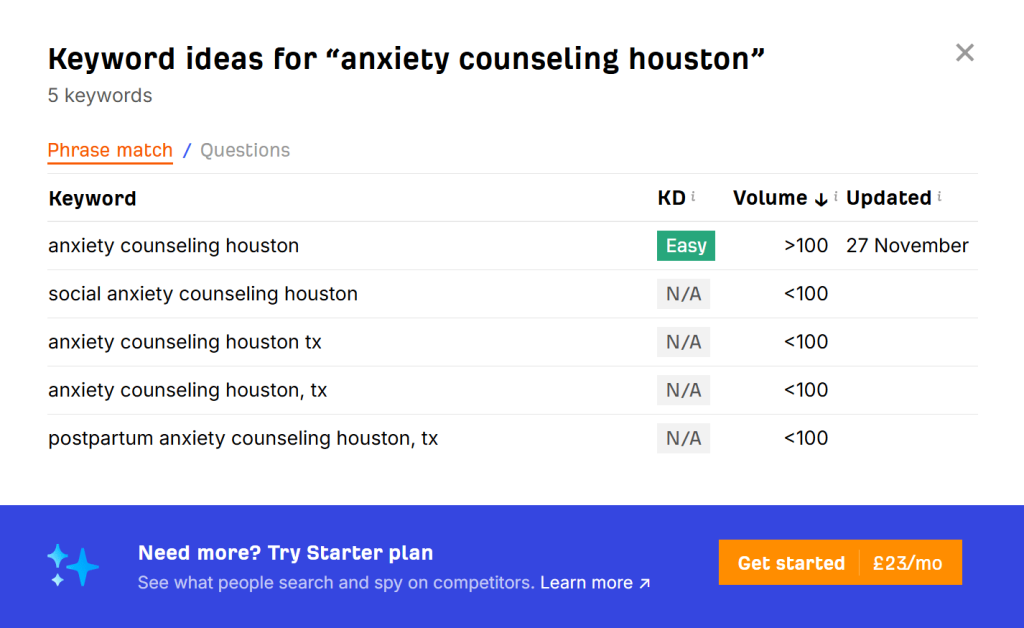
“Volume” is an estimate of the average number of monthly Google searches this term receives. The more searches, the more interest the keyword has.
It is good but not essential to see a number higher than zero in this column for the keyword you’re targeting. Some niche specialties may show zero volume, even when the actual number is 10-50 or so.
If the volume number is very high, such as over 5,000, we would not recommend targeting this term, as this often indicates the keyword will be too difficult to rank for. The more monthly searches there are, the more competition there is to rank for that term.
It is also important to know, the keywords you choose should be highly relevant to your business and your expertise. In other words, they should be in your wheelhouse.
The process of finding keywords is mostly about narrowing down how you should be describing your services, not deciding which services to advertise or provide.
Step #2: Use keywords in the right places on your website
This is the part that involves the most work, but it’s also the most important, so bear with me.
Taking the example we mentioned before, say you’re an LGBT-affirming therapist in Phoenix, and you decided to target these three keywords:
- lgbt affirming therapy phoenix
- transgender counseling phoenix
- lgbt couples counseling phoenix
Here’s what you need to do.
Assign each keyword to a page
You want to target each keyword (meaning, try to show up in Google for it) using a specific page on your website.
This should be based on what makes the most sense for your human readers. So, if you have a fleshed-out website already, it should be suitably structured, but one or two things may need tweaking slightly.
For most therapists, this simply means having a service or specialty page for each keyword you want to target, assuming it makes sense to have a specific page about that topic.
For the main keyword you want to target, which is the broadest one, or the one that best sums up your services, you can target it with your website homepage.
If you have a keyword it wouldn’t make sense to have its own page for, this is fine. You can target it by talking about this topic in-depth as a subsection of another page, or not talk about it at all if it wouldn’t make sense to.
Example
- Homepage targets “lgbt affirming therapy phoenix”
- Services page one targets “transgender counseling phoenix”
- Services page two targets “lgbt couples counseling phoenix”
Use keywords in page titles
The page title is what your webpage is officially titled. It displays in Google Search results, and heavily influences search engines’ understanding of what a page is about, but is not visible to users.

You should include the keyword in the page title, but use natural language, so it reads normally to humans (there are some examples a bit below in case this sounds confusing).
Having the keyword towards the beginning of the title is helpful, and it should be a maximum of 60 characters in length, because the title gets cut off by Google after this point in the search results.
Example
Remember, the keywords we’re targeting are:
- “lgbt affirming therapy phoenix” on the homepage
- “transgender counseling phoenix” on a services page
- “lgbt couples counseling phoenix” on another services page
The order of words in the keyword can be swapped as long as the meaning stays intact, and other words can be inserted between words in the keyword. The most important thing is that it reads naturally.
So, we would write our page titles as follows:
- Homepage title: “Rainbow Roots Counseling – Phoenix LGBT Affirming Therapy”
- Services page one title: “Phoenix Transgender Counseling Service”
- Services page two title: “LGBT Couples Counseling In Phoenix”
The above example sort of assumes this is a therapy practice with multiple counselors. If you are practicing alone, you can adjust the wording accordingly, for example changing “Phoenix Transgender Counseling Service” to “Transgender Counselor Based In Phoenix” or similar if you’d prefer.
How to edit the page title
On Squarespace, you can edit the page title by first going to SEO/AIO on the left-hand side, then clicking “Pages with metadata.”

Click “Edit” on a page you want to change:

Edit the title, and click “Save.”

Use keywords in main headers
The main header, also known as Heading 1 or H1, is the most prominent heading visible to users on the page.

You should mention your target keyword or a similar phrase here as well. The text can be very similar to or the same as your page title, but there is no length limit this time.
Example
To target these keywords:
- “lgbt affirming therapy phoenix” on the homepage
- “transgender counseling phoenix” on a services page
- “lgbt couples counseling phoenix” on a different services page
We would use something like the following:
- Homepage H1: “Rainbow Roots Counseling – Phoenix LGBT Affirming Therapy”
- Services page one H1: “Phoenix Transgender Counseling Service”
- Services page two H1: “LGBT Couples Counseling In Phoenix”
How to edit the page header
On Squarespace, to change the main header/H1, edit a page, and look for the header with the label “Heading 1”:

Most website builder platforms allow you to edit the header in a similar way, but if your website is custom-coded, changing the H1 may be more difficult.
Step #3: Optimize your Google My Business listing
For therapists providing in-person care, your Google My Business (GMB) listing is crucial to your SEO performance.
Your GMB profile determines how you show up on Google Maps, which is where a significant portion of clients discover private practice therapists, in our experience.
Sign up for a GMB listing here, if you haven’t already. Unfortunately, this is not available if you only provide online counseling, because you will need to verify your business address.
Once everything is live, there are three key things you need to think about.
We have discussed them below, but for more detail, please see our guide to getting more clients as a therapist.
Fill out your profile thoroughly
Once you log into GMB, to maximize your visibility, fill out all relevant fields.
The more information Google has in your listing, the more likely they are to display you in the results, because they think that providing more information and media to the searcher will result in a better user experience.
For example, you can:
- Write a description of your business (explain who you help and how, and a bit about yourself/your counselors)
- Set your business hours
- Provide contact information and social media links
- Specify if you have parking and/or disabled access available
- Specify other amenities you have
- Specify that your practice is women-owned, if it is
Then, it’s good to add some photos of you and your practice to your listing, to help it stand out.
To do this, go to the GMB homepage, click the photo icon, and upload your photos.

These will display when people view your business in Google Maps, or search for it directly in Google Search, helping to improve the click-through rate to your website.

Optimize certain fields
In GMB, you can define your business category, which is important in determining the types of queries you show up for.

This should be set to “psychotherapist” in most cases, but if you find something else that more closely matches what you do, such as “EMDR psychotherapist,” choose that instead.
There are also subcategories you can choose. Add as many as are relevant to your practice.

The next thing you want to optimize is your business name. This field can have a major impact on the search terms people type into Google Maps that you show up for.

However, you need to be careful when changing this field. Your business name must actually reflect what your business is called.
Therefore, if you have any flexibility in choosing your business name, it is helpful if it describes the services you provide, and potentially your geography as well.
For example:
- Good: “Rainbow LGBT Counseling Phoenix”, “Rainbow LGBT Counseling”, or “LGBT Counseling Co”.
- Suboptimal: “Rainbow Counseling”.
- Bad: “LGBT Transgender Queer Lesbian Counseling Phoenix Sedona Tucson” – trying to maximize the number of keywords included is called keyword stuffing, and you will be penalized by Google for doing this. The business name should read naturally.
Get more reviews
The therapy practices that rank highest in Google Search often have a higher number of reviews on their GMB profile.
For example, if we search for an anxiety therapist in Alabama, we can see that the top results have a number of reviews on their profiles.

To begin with, getting just five to ten reviews can be very helpful for SEO purposes. You don’t need 30-50 reviews to move the needle.
However, as a therapist, you might not be allowed to solicit testimonials under your professional code of ethics, so getting more Google reviews can be tough.
If you can’t or don’t want to ask clients for reviews, just make sure that you’ve fully filled out your GMB listing, so that it shows up when people search your name on Google, and so that it shows signs of activity.
Focus on providing the best service you possibly can, and reviews will begin to come over time.
Step #4: Get mentioned more often
This is the “off-page” part of SEO, which we mentioned a bit earlier.
Google and other search engines do not just use your website content to decide whether to rank you for a given search term or not.
Instead, they also assess the authority of your business and website. And to do this, they look at where else you are mentioned on the web, and how you are described.
Historically, SEO used to be extremely focused on “backlinks” – a link from another website, ideally a reputable, trustworthy one, like a government website, to your website.
Backlinks are helpful, but it is also useful to be mentioned by name instead, without a link.
For therapists, this means that to help your SEO, it is useful to be named in relevant places elsewhere on the web.
Some examples of ways to get mentioned include:
- Listing on therapist directories, including those run by your professional body if applicable, such as the APA Psychologist Locator. You can join our directory at Counseling.co free of charge if you’re a licensed therapist, counselor, or psychologist in the United States.
- Joining the local Chamber of Commerce, if they list members on their website.
- Collaborate with other businesses or community organizations if this can result in a mention on their website or social media.
- Be named as a source on an online local news story – this will take more effort, but you can begin by approaching reporters and introducing yourself as a local source on mental health-related topics, if you feel comfortable doing so.
If you gain publicity but don’t get mentioned by name online (for example, if you’re featured on radio or TV) this can also have a similar positive effect, in that more people will do online searches for your name, or business name.
Search engines measure the number of “branded” searches you get, and use this as another measure of your reputability.
Step #5: Run these checks on your website
A significant part of what search engines assess is the user experience of your website.
For example:
- Is it easy to read and navigate?
- Is it accessible to people using assistive technology?
- Does it provide useful information?
- Is it easy to use on mobile devices?
- Does it load quickly?
Some of these types of issues require technical expertise to fix, however, you can also address many of them by yourself.
Here are the most important checks that we recommend performing.
Google Pagespeed Insights and accessibility
Go to Google Pagespeed Insights, type in your website homepage, and run the test.
Pay attention to the “Performance,” “Accessibility,” and “SEO” ratings.

This tool effectively grades your website performance out of 100 in these key areas. If you click on one of the numbers, you can learn more about why your score is assessed the way it is.
If your score is low, with a therapist website, this isn’t normally a concern, depending on the metric, so no need to panic.
Here’s what you need to know:
Performance measures site loading speed. Very slow websites can be penalized for this in Google’s rankings.
If this score is above 50, this is fine. If your score is very low, fixing these types of issues is not easy, and generally requires technical help.
Accessibility measures how usable your website is to people using assistive technology, such as screen readers. It is best to avoid having this score below 80 if possible, because Google does not want to display inaccessible websites to users.
Most of the issues in this category are difficult to fix on your own, except for recommendations to add image alt text, which you can do yourself if you’re using a platform like Squarespace, and color contrast warnings, which you can normally fix by changing background or text colors.
To add alt text in Squarespace or Wix, click on an image, and change the “Alt text” field so that it contains a written description of what is shown in the image, to assist blind people.

The SEO score normally flags basic (but sometimes serious) SEO-related problems. If this score is below 80, it can be a concern. A very low SEO score can indicate technical issues that are preventing your website from displaying at all in Google search.
If your SEO score is very low, type “site:counseling.co” into Google, replacing our website domain name with yours. Check that your website and all the pages you would expect to display show up, such as your contact, about, and service pages.
If many pages are missing, it may be worth checking which issues are showing up on the report, which you can do by clicking on your SEO score on Pagespeed Insights.

If you have failed the test due to robots.txt issues, a lack of a successful HTTP status code, or the page being blocked from indexing, it is worth having this investigated.
Mobile usability
Google primarily assesses websites based on how they appear on mobile devices.
Therefore, you need to make sure that your website is accessible on small screens.
To do this, simply open your website on your phone and navigate through every page, one by one.
Check that:
- Text is large enough to read.
- Images are not too small.
- Links and buttons are not too small to click.
- Forms work properly.
If you have an older website and are running into these sorts of issues, it may be worth upgrading to a platform like Squarespace, as it handles the mobile version of your website automatically, ensuring that it’s as easy to use as your desktop site.
Content depth
This one is a lot more subjective, but in short, you want to ensure you are providing adequate amounts of content on pages you want to rank in search, such as your homepage or services pages.
If your pages are too “thin,” meaning they don’t provide enough depth on the topic, they are less likely to rank. However, there is a balance to achieve, because you don’t want to stuff the page full of unnecessary content and worsen the user experience.
As an example, this is a section of a page that ranks well for terms relating to stress counseling in Houston.

This is the stress-specific specialty page. It provides in-depth information about the types of stress that commonly come about, and describes in detail how these issues are managed in therapy.
This is the sort of content depth it can be useful to have, to the extent you think it is useful for a client viewing the page.
Conclusion and final advice
If you’re an individual therapist in private practice and your website is a bit outdated, we highly recommend switching to Squarespace if you’re concerned about SEO.
It allows you to build a website yourself, with a bit of effort, saving you the cost of hiring someone else to do it. But the main benefit of their platform is it handles most of the SEO basics for you, especially the more technical aspects we mentioned under step five.
For example, it ensures that your website works well on mobile devices, and loads your content fast. It also allows you to tweak things like your page titles and H1 tags with relative ease, if you ever want to change them.
Thanks for reading this article – I hope it was helpful, and not too confusing.
If you have any questions about SEO for your therapy practice, or want your marketing plan sanity-checked, book a marketing consulting call with me at a time that works for you.
And make sure to join our counselor and therapist directory to get more visibility for your practice.